Organization Node Audits
2 minute read
Node audits provide records when services on a node are invoked, or when upgrades are applied. This page shows node audits from all nodes in an organization.
Node audits for the entire organization are available by navigating to Operations > Node Audits.

To view audits for a specific node, navigate to that node and select Audits under the History section. See Node Audits for more information.
audits::read:node permissions.Searching Node Audits
Search Bar
The search bar at the top of the table performs a full text search across Event, Node, and Value fields. Type a search term and press Enter to filter the results. Searches match the full value of a field or substrings up to 16 characters.
Date Range
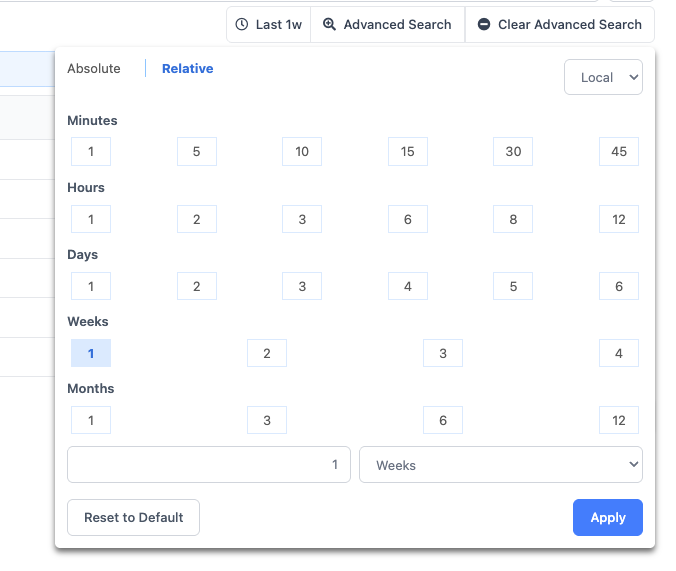
The date range selector is always visible above the node audits table, showing the currently active time window. The default range is Last 1w. Click the date range button to change the range. The selector supports both relative ranges (e.g., Last 2h, Last 1w) and absolute date/time ranges.
Timezone
Use the UTC/Local toggle on the date range selector to switch between UTC and your local timezone. This affects all timestamps displayed in the table. CSV exports are always in UTC.
Advanced Search
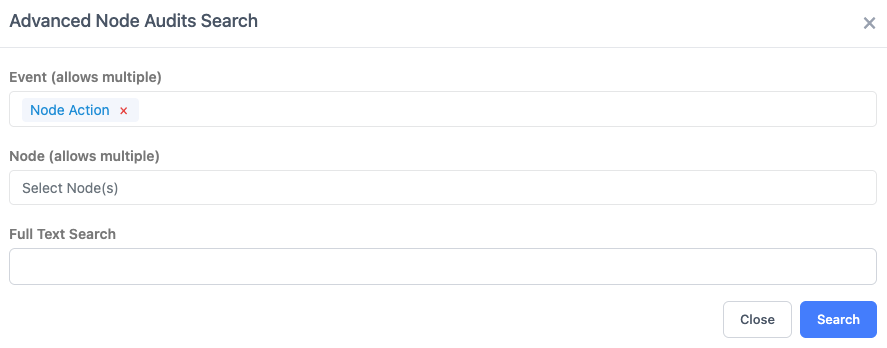
Click Advanced Search to filter node audits using any combination of the following fields:
| Field Name | Description |
|---|---|
| Event | Filter by the audit category (e.g., upgrade, service invocation) |
| Node | Filter by one or more specific nodes |
| Full Text Search | Search across Node, Event, and Value for matching text |
Actions Menu
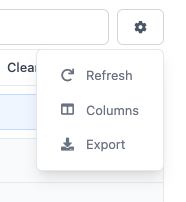
The gear icon above the table provides access to:
- Refresh - Refresh the table results
- Export - Download the current filtered results as a CSV file.
- Column Selector - Choose which columns are visible in the table.
Feedback
Was this page helpful?
Glad to hear it! Please tell us how we can improve.
Sorry to hear that. Please tell us how we can improve.