January 2026 Major Release Notes
4 minute read
Lifecycle State Attribute
A new Lifecycle State attribute has been added as a more formal and consistent way to manage resource states across Trustgrid. Historically this was managed via a Production Status Tag or similar custom tags. The new Lifecycle State attribute provides a standardized approach to indicate the current state of a resource.
The Lifecycle State attribute can be set to one of the following values:
pre-production- Indicates that the resource is in a pre-production state, such as deployment, configuration or testing.production- Indicates that the resource is in active production use.maintenance- Indicates that the resource is temporarily out of service for maintenance or updates.decommissioned- Indicates that the resource is no longer in use and is being retired.
The Lifecycle State attribute can be set and modified at the individual node (appliance or agent) from the infovisor section. It can also be set at the cluster level for appliances via the cluster overview page, which will propagate the value to all appliances within the cluster.
Additionally, the Lifecycle State attribute is now available as a filter option in various sections of the Trustgrid UI, including:
Cluster Health Tools
Two new tools have been added to help diagnose and remediate issues with cluster members and their communication. Both of these tools require that cluster members are running Trustgrid software version from November 2025 Minor release or later.
View Cluster Health
The View Cluster Health tool will trigger both nodes to run a service that evaluates the health of the cluster members and reports back key data points. This can be helpful to determine why a member is not taking or retaining the active role.
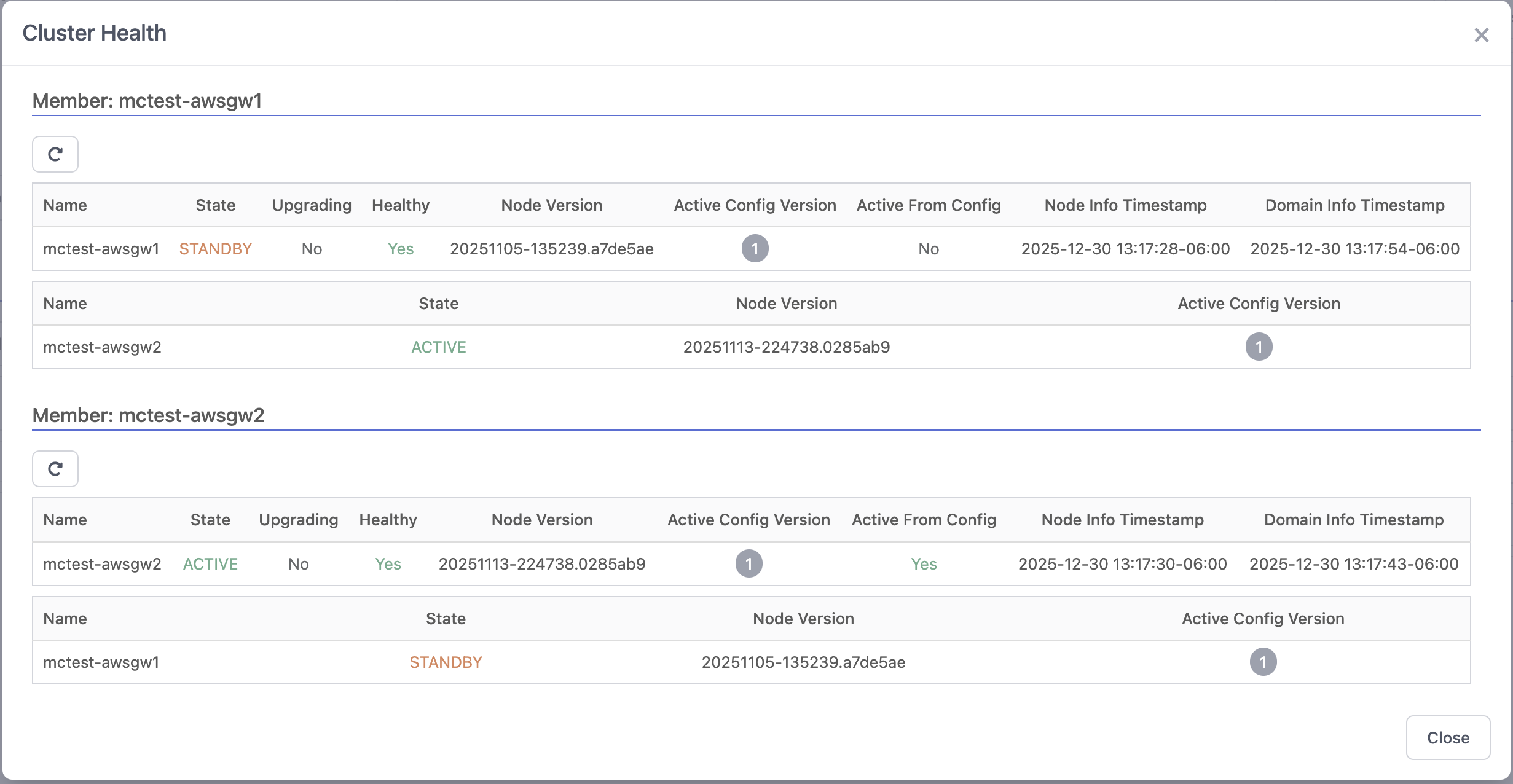
Restart Cluster Server
The Restart Cluster Server tool allows you to restart the cluster server service on a cluster member without restarting the entire node. This can be useful in situations where both members are reporting as active or standby, and a restart is needed to restore normal operation.
Events and Alarm Improvements
This release includes several enhancements to the Events and Alarms system to improve usability and functionality.
- The backend database for Events has been migrated to a faster solution that should allow for further improvements in the future.
- The Advanced Search option has been added that allows users to filter events by multiple criteria, including date range, event type, level, node, and text. The results can then be exported to CSV for further analysis.
- The Generic Webhook notification channel will now include the Alarm Filters
Descriptiondata in anotes:field within the payload. - The ‘Domain’ field is now included in the Events data for better context for customers with multiple accounts/organizations.
- Adds the ability to send a test event to a Channel to test it independent of any filter.
/v2/eventAPI endpoint now paginates results. Previously only the first page was returned regardless of the number of events.- Resolves an issue where many events were being logged when an Alert Suppression window closed.
Deprecations
- With this release ZTNA Applications and related pages have been removed.
- VM Management functionality has been removed.
Dependency upgrades and visual changes
We updated and modernized many of the front-end libraries and dependencies that power the Trustgrid portal. While we made a conscious effort to preserve the existing look-and-feel, several libraries were rev’d to newer major and minor versions which introduced small visual differences in UI elements (spacing, form controls, font rendering and button styles).
What to expect:
- Slight adjustments to spacing and alignment in some tables, forms and dialogs.
- Minor differences in button and input control appearance (borders, focus states, and hover styles).
- Small typography/rendering differences across browsers due to updated font stacks or CSS resets.
Why this happened:
- Many dependencies had security fixes, performance improvements, and accessibility updates that required upgrading to newer versions.
- Some upstream component libraries introduced improved defaults that change visual details even when API usage is unchanged.
If you see a visual regression or something that impacts workflow, please file an issue with steps to reproduce and screenshots so we can evaluate and address it quickly.
Other Improvements and Fixes
- Resolves an issue where the
Pathfield value disappeared when editing VPN Dynamic and Static routes. - Fixes an issue that caused flow logs sorted by Send/Receive bytes to not treat 0 bytes as the lowest value, improving sorting accuracy.
- Container Repository images can now include multiple directories. E.g. example.trustgrid.io/directory/image:tag
- Users will now receive a more helpful error message if their IdP credentials are invalid during SSO login attempts.
- Enabling UDP will now only warn about a restart being required if the node is enabled as a gateway. Edge nodes do not require a restart when enabling UDP.
- Virtual network routes now sort by
Destination CIDRby default. - Fixes an issue where the CSV export of VPN NAT hits included a comma as a thousands separator, causing import issues in some spreadsheet applications. This removes the comma for better compatibility.
Feedback
Was this page helpful?
Glad to hear it! Please tell us how we can improve.
Sorry to hear that. Please tell us how we can improve.