AWS Cluster IP Failover
4 minute read
This tutorial covers the cluster IP failover mechanism for AWS-hosted Trustgrid clusters. The active cluster member claims a configured IP as a secondary private IP on its data ENI via ec2:AssignPrivateIpAddresses (with AllowReassignment=true). On failover, the standby promotes itself and reclaims the same secondary IP on its own ENI — no AWS route-table updates required.
For L3 overlay route failover instead, see Configure HA Gateway Cluster in AWS.
How it works
The cluster IP is an unused private IP in the data-interface subnet. Whichever cluster member is active assigns that IP to its data ENI as a secondary address. When the active member fails or relinquishes its role, the new active member calls ec2:AssignPrivateIpAddresses with AllowReassignment=true, which atomically migrates the secondary IP from the old ENI to the new one.
Graceful Failover
- The relinquishing member unassigns the secondary IP from its data ENI.
- The newly active member assigns the secondary IP to its data ENI.
Ungraceful Failover
- After the Cluster Timeout period elapses, the newly active member calls
AssignPrivateIpAddresses(AllowReassignment=true), migrating the secondary IP regardless of the prior active member’s state.
Requirements
IAM Instance Profile
Each cluster member’s IAM instance profile must allow the following actions. The ec2:Describe* actions require "Resource": "*"; the AssignPrivateIpAddresses and UnassignPrivateIpAddresses actions should be scoped to the specific ENI ARNs for least-privilege access.
{
  "Effect": "Allow",
  "Action": [
    "ec2:DescribeNetworkInterfaces",
    "ec2:DescribeInstances"
  ],
  "Resource": "*"
},
{
  "Effect": "Allow",
  "Action": [
    "ec2:AssignPrivateIpAddresses",
    "ec2:UnassignPrivateIpAddresses"
  ],
  "Resource": "arn:aws:ec2:<region>:<account-id>:network-interface/<eni-id>"
}
Replace <eni-id> with the ENI IDs for both cluster members’ data interfaces, adding one statement per ENI or combining them in the Resource list.
Source/Destination Check
The source/destination check must be disabled on each cluster member’s data ENI. The CloudFormation template and the aws-auto-reg module disable this automatically. Verify in the AWS Console under EC2 > Network Interfaces > Change Source/Dest Check.
Subnet IP Availability
The cluster IP must be an unused private IP in the same subnet as the cluster members’ data NICs. It is not an Elastic IP — it is a secondary private IPv4 address within the VPC CIDR.
Configuration
Portal
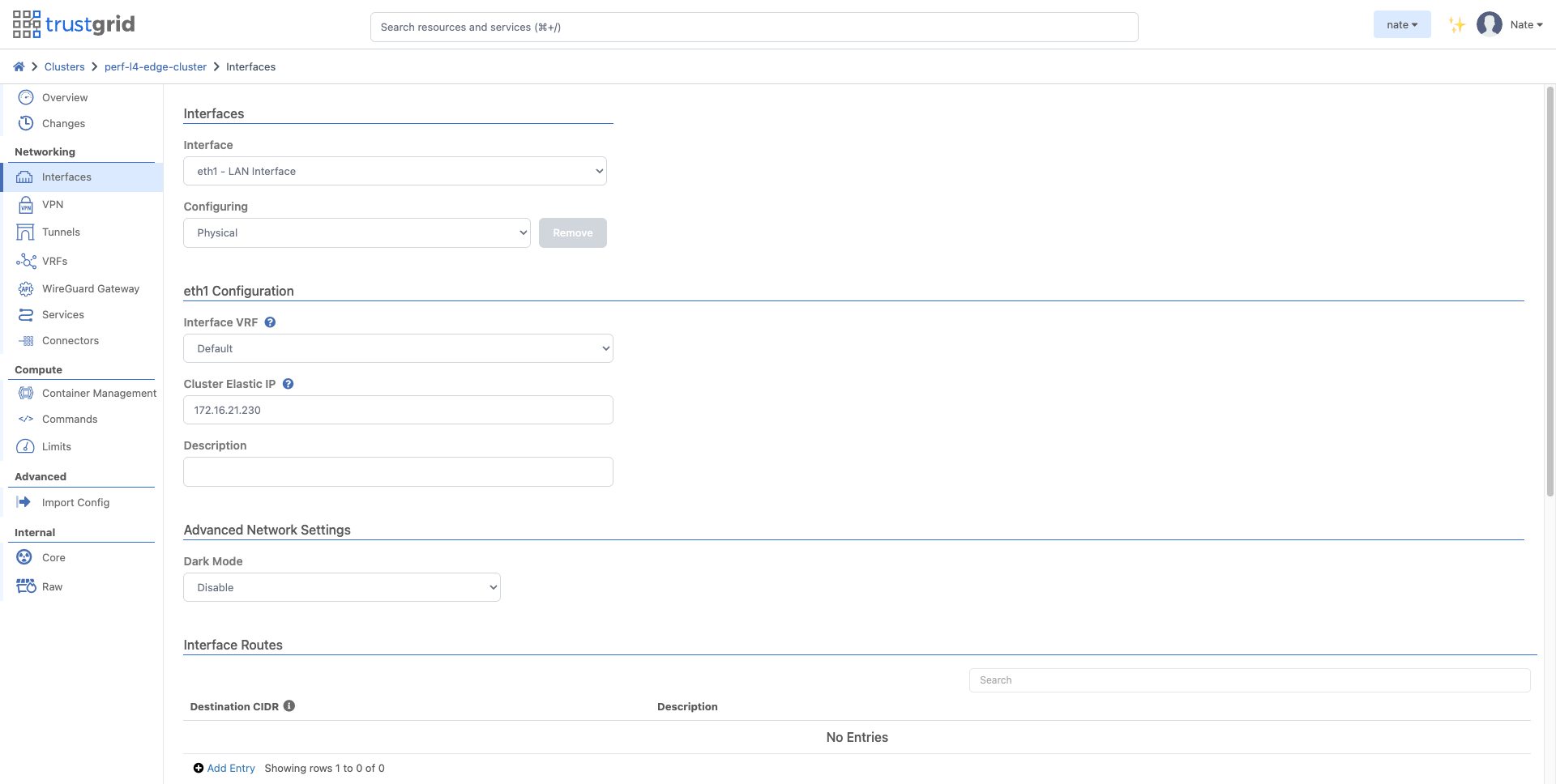
- Navigate to the cluster in the Trustgrid portal.
- Select Interfaces, then the LAN interface (typically
eth1). - Set the Cluster Elastic IP field to the reserved private IP.
- Save. The active cluster member will assign the secondary IP to its data ENI immediately. No restart is required.
Terraform
Use the tg_node_interface resource with the cluster_ip argument:
resource "tg_node_interface" "lan" {
  node_fqdn  = var.node_fqdn
  nic        = "eth1"
  cluster_ip = "10.0.1.50"   # unused IP in the data subnet
}
The cluster_ip field is applied in-place — changing it on a running cluster takes effect immediately without a service restart.
How LAN Hosts Use the Cluster IP
LAN hosts typically use the cluster IP as their next-hop gateway for remote virtual-network CIDRs. For example, on a Linux host on the same subnet:
ip route add 172.16.0.0/12 via 10.0.1.50
Because the cluster IP follows the active member automatically, no route-table update is needed on the LAN host side during failover.
Failover Behavior
- New TCP connections succeed within seconds of a failover — the secondary IP migrates to the new active member and AWS propagates the change at the VPC level.
- Existing TCP sessions are torn down; clients must reconnect.
- Cluster IP changes (e.g. updating the configured value) take effect live on the active member and are reconciled on the standby member when it restarts or becomes active. Cluster IP changes made while the active member is stopped are picked up cleanly on restart at both the AWS ENI and OS levels.
Related
- AWS Cluster Route Failover — route-table failover alternative
- HA L4 Cluster in AWS — using the cluster IP on L4 connectors and services
- Cluster-Only Configuration Items — cluster IP reference documentation
Feedback
Was this page helpful?
Glad to hear it! Please tell us how we can improve.
Sorry to hear that. Please tell us how we can improve.