Packet Simulator Interface Tool
3 minute read
The Packet Simulator shows what a node would do with a packet that enters one of its interfaces. You supply the interface, protocol, and addresses. The node walks the packet through its NAT, ACL, and routing rules without sending any traffic, then reports each step and whether the packet was forwarded or blocked.
Use it to confirm a virtual network configuration before sending real traffic, or to find which rule is dropping a flow.
nodes::service:packet-sim permission. The built-in policies tg-monitor, tg-operator, and tg-node-admin grant this permission by default. The Packet Simulator button is hidden for users without it.Using the Packet Simulator
- Log in to the Trustgrid portal and navigate to the node you want to test.
- Select Interfaces under the Network section. From the dropdown, select the interface the packet should enter.
- Click the Packet Simulator button in the Interface Tools section.

Packet Simulator button in Interface Tools. - Fill in the form.
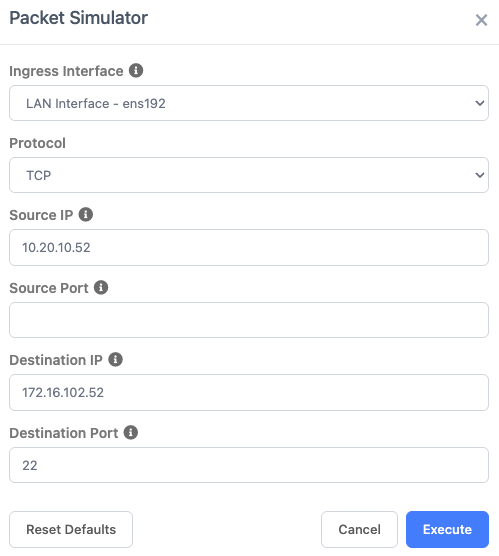
Packet Simulator form. Field Name Description Ingress Interface Required. The interface the simulated packet enters. Defaults to the interface selected on the page. Protocol TCP,UDP, orICMP. Defaults toTCP.Source IP Required. The IPv4 source address of the packet. Source Port Optional. The source port, from 1to65535.Destination IP Required. The IPv4 destination address of the packet. Destination Port Required. The destination port, from 1to65535. - Click Execute to run the simulation.
- Review the result. Click Back to adjust the inputs and run again, or Close to finish.
Reading the Result
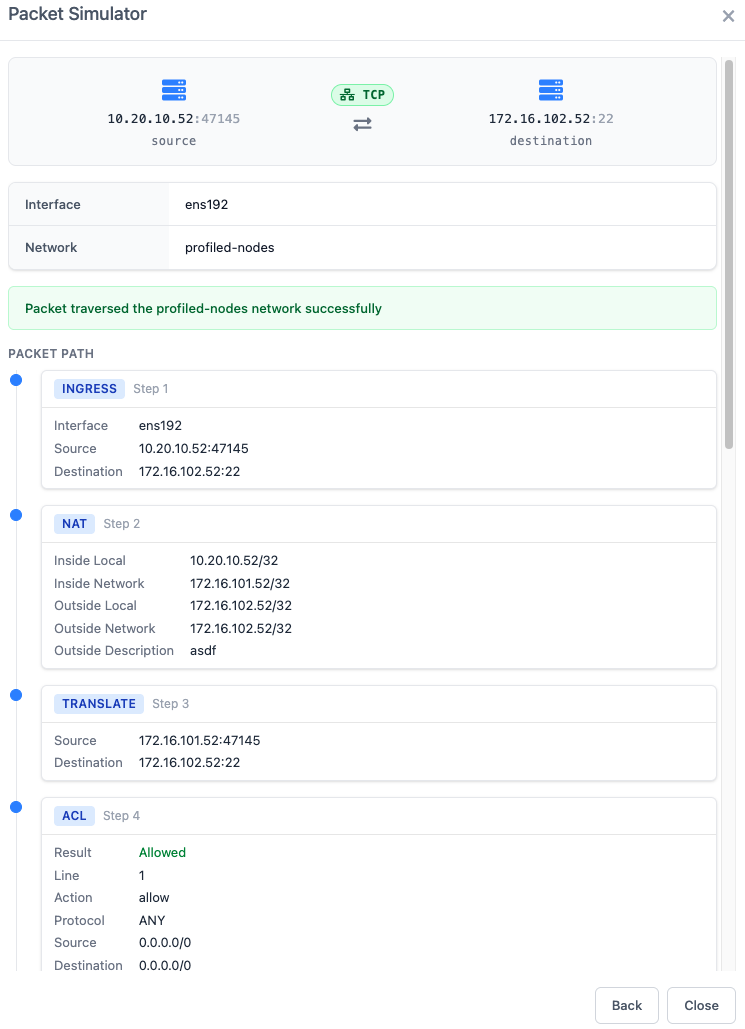
The top of the result shows the source and destination with a protocol badge, followed by the interface and the virtual network that handled the packet.
A status line summarizes the outcome:
Packet traversed the <network> network successfullymeans the packet would be forwarded.Packet blocked at the <stage> stagenames the step that stopped the packet.Packet blocked at the <stage> stage: <error>is the same, with an error reported by the node. ACL denies and route failures currently appendPacket simulation timed out; the packet was still blocked at the named stage.Packet blocked: <error>appears only when the node reports an error and no step in the path is marked as blocking.
If the node rejects the request itself, for example with Invalid sourceIp specified, the modal shows Failed to run the packet simulation: <message> instead of a result.
Below the status line, the path lists each step the packet took in order. Steps that block the packet are shown in red.
| Field Name | Description |
|---|---|
| Ingress | The packet entering the node, with the interface, source, and destination. |
| NAT | A matching NAT rule, with its inside and outside addresses, networks, and descriptions. |
| Translate | The source and destination after NAT is applied. |
| ACL | The access policy evaluation. Shows Allowed or Denied and the matching line. When a specific rule matched, its action, protocol, source, destination, and ports are also shown. |
| Route | The matching route with its destination, next hop, metric, and description. Shows No route to destination when no route matches. |
| Forward | Where the packet is forwarded, including the destination type and protocol. |
| Egress | The packet leaving the node, with the interface, source, destination, and protocol. |
| No Rule | No rule matched the packet. Includes a message from the node explaining why. |
A denied ACL, a missing route, and No Rule all block the packet.
Related Tools
The Trustgrid MCP server can run the same simulation from an AI agent.
Feedback
Was this page helpful?
Glad to hear it! Please tell us how we can improve.
Sorry to hear that. Please tell us how we can improve.